
INI-CET July 2026 Registration Begins: Key Dates and Application Steps
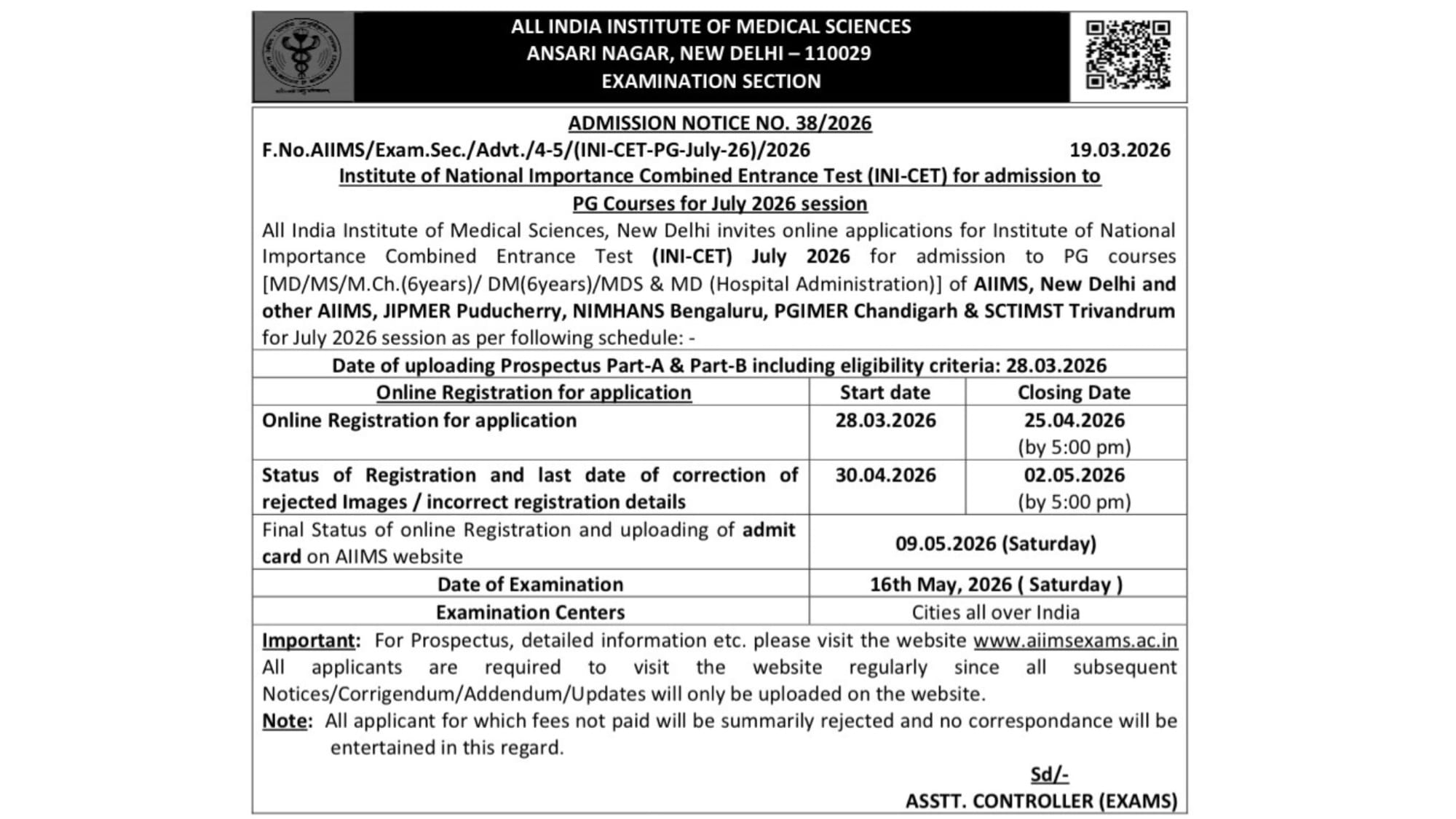
The wait is officially over for postgraduate aspirants targeting the premier institutes of the country. AIIMS New Delhi has formally released Admission Notice No. 38/2026, officially kicking off the registration process for the INI-CET July 2026 session.
If you are aiming for an MD, MS, M.Ch, DM, or MDS seat at AIIMS, JIPMER, NIMHANS, PGIMER, or SCTIMST, it is time to get your paperwork in order. The portal opened yesterday, March 28, and the clock is ticking.
🚨 Key Dates You Cannot Miss:
• Online Registration Opens: March 28, 2026
• Online Registration Closes: April 25, 2026 (Strictly by 5:00 PM)
• Correction Window (for rejected images/details): April 30 – May 2, 2026 (by 5:00 PM)
• Admit Card Upload: May 9, 2026 (Saturday)
• Examination Date: May 16, 2026 (Saturday)
📝 How to Register: The 3-Step PAAR Process
AIIMS uses the Prospective Applicants Advanced Registration (PAAR) system. It is notoriously strict, especially regarding image uploads, so follow these steps carefully on the official website (aiimsexams.ac.in):
Step 1: Basic Registration
• Navigate to the “Academic Courses” tab and select “INI-CET”.
• Click on “Proceed” to enter the Basic Registration zone.
• Fill in your personal details to generate your Registration ID and Password.
• Crucial Step: Upload your passport-size photograph, signature, and left thumb impression.
Note: AIIMS rejects thousands of applications every year due to incorrect image dimensions or blurry uploads. Double-check their strict formatting guidelines before hitting submit.
Step 2: Generation of EUC (Examination Unique Code)
• Once your Basic Registration is accepted, you must generate your EUC.
• Log in with your Registration ID and Password, and click on “Generate EUC”. This code is mandatory to proceed to the final step and is unique to the July 2026 session.
- INI-CET July 2026 Registration Begins: Key Dates and Application Steps
- Online Feedback Portal: NMC Allows Anonymous Reporting on Faculty and Infrastructure
- BRD Medical College: 1998 Batch MBBS Student Gets Result After HC Order, Fails Again
Step 3: Final Registration
• Log in again using your Registration ID, Password, and your newly generated EUC.
• Fill in your academic details (MBBS/BDS marks, internship status, medical council registration).
• Choose your preferred examination center.
• Pay the application fee online. Your application is officially considered incomplete until the fee goes through.
• Print and save the final confirmation page for your records.


